
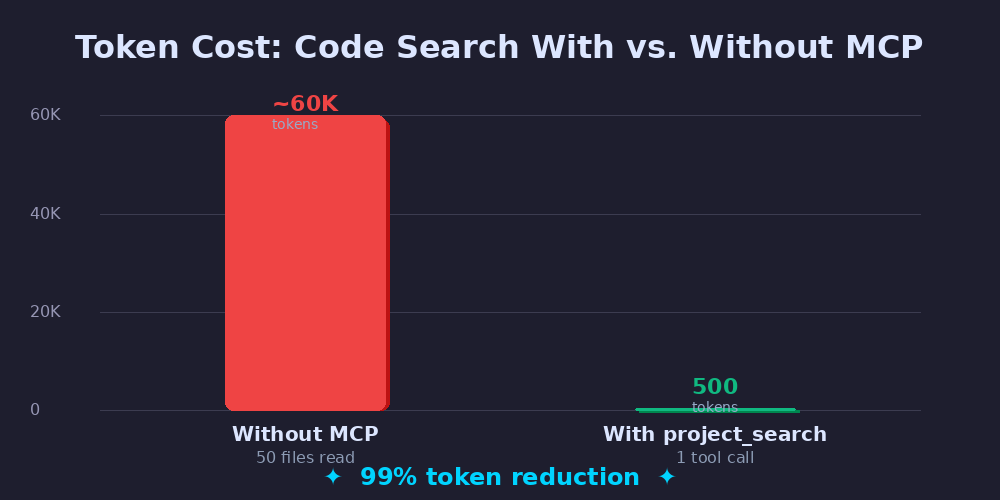
Picture this: you ask Claude to find where UserRepository is defined in your codebase. Without the right tooling, Claude will list directories, then read file after file, scanning each one for the class declaration. Fifty files later — at roughly 1,200 tokens per file — you’ve burned through 60,000 tokens and gotten one line of output.
What if that same answer cost 500 tokens and took a single tool call?
That’s the problem I set out to solve with project_search — an open-source MCP (Model Context Protocol) server that gives Claude a fast, token-efficient interface for navigating and searching code. This post walks through why I built it, how it works under the hood, and five engineering lessons that apply to any MCP server you might build.
👉 github.com/oumarkonate/project_search
What is MCP?
The Model Context Protocol is an open standard from Anthropic that lets AI assistants like Claude call external tools over a well-defined interface. Think of it as a USB-C port for LLM capabilities: you plug in a server, expose a set of typed tools, and Claude can call them just like any function.
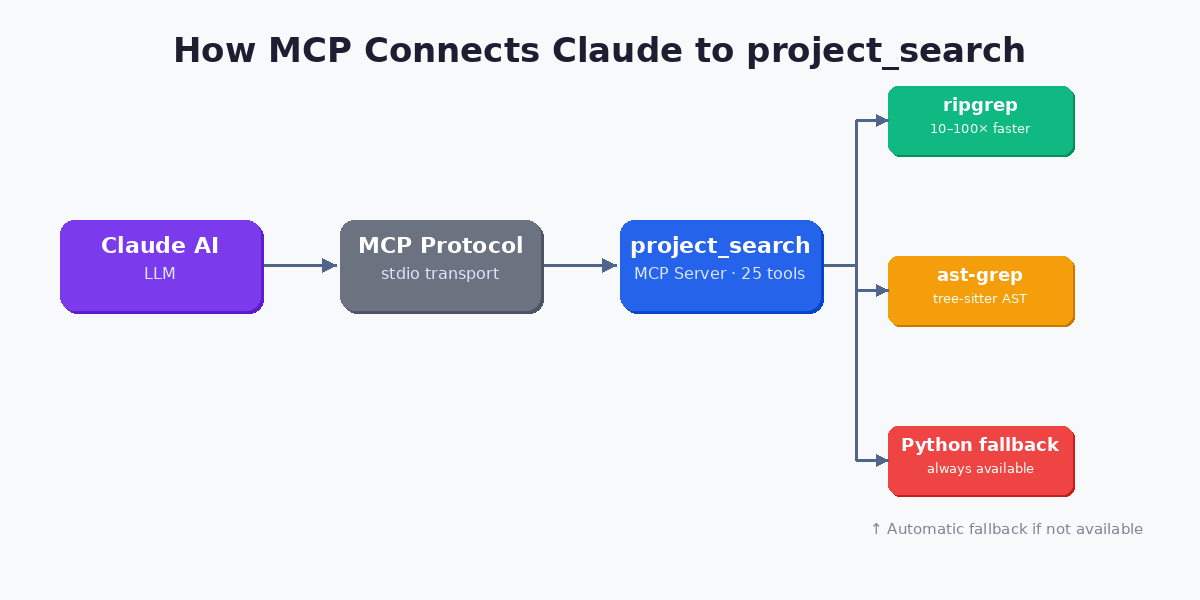
The communication channel is simple: Claude sends a JSON-RPC call over stdio, the MCP server executes the tool, and returns a structured result. There’s no HTTP, no auth tokens, no polling. It’s fast, local, and synchronous from Claude’s perspective.
What makes MCP transformative is specificity. Instead of a generic “run this shell command” escape hatch, each MCP tool has a name, a typed input schema, and a contract. Claude knows exactly what find_class does and when to call it. That predictability is what makes token economy possible.
The Real Cost of Code Search Without MCP
To understand why project_search exists, let’s do the math on the naive approach. When Claude needs to find a class definition without dedicated tools, it typically:
- Lists the directory tree to find candidate files
- Reads each file that might contain the class
- Scans the content manually within its context window
On a mid-size PHP or TypeScript project with 200–500 source files, this chain can easily touch 50 files. At ~1,200 tokens per average source file, that’s 60,000 tokens just for a single lookup.
The downstream effects compound quickly:
- API cost: At Claude Sonnet pricing, 60K tokens per search adds up fast in an interactive session
- Context pressure: Every token spent on file reads is a token unavailable for reasoning, code generation, or remembering earlier conversation
- Latency: Reading 50 files sequentially adds several seconds of round-trips
- Accuracy: Skimming large files inside a busy context window is error-prone
The fix isn’t to give Claude a better search prompt. It’s to give Claude better tools — tools that return exactly what it needs, nothing more.
Architecture of project_search
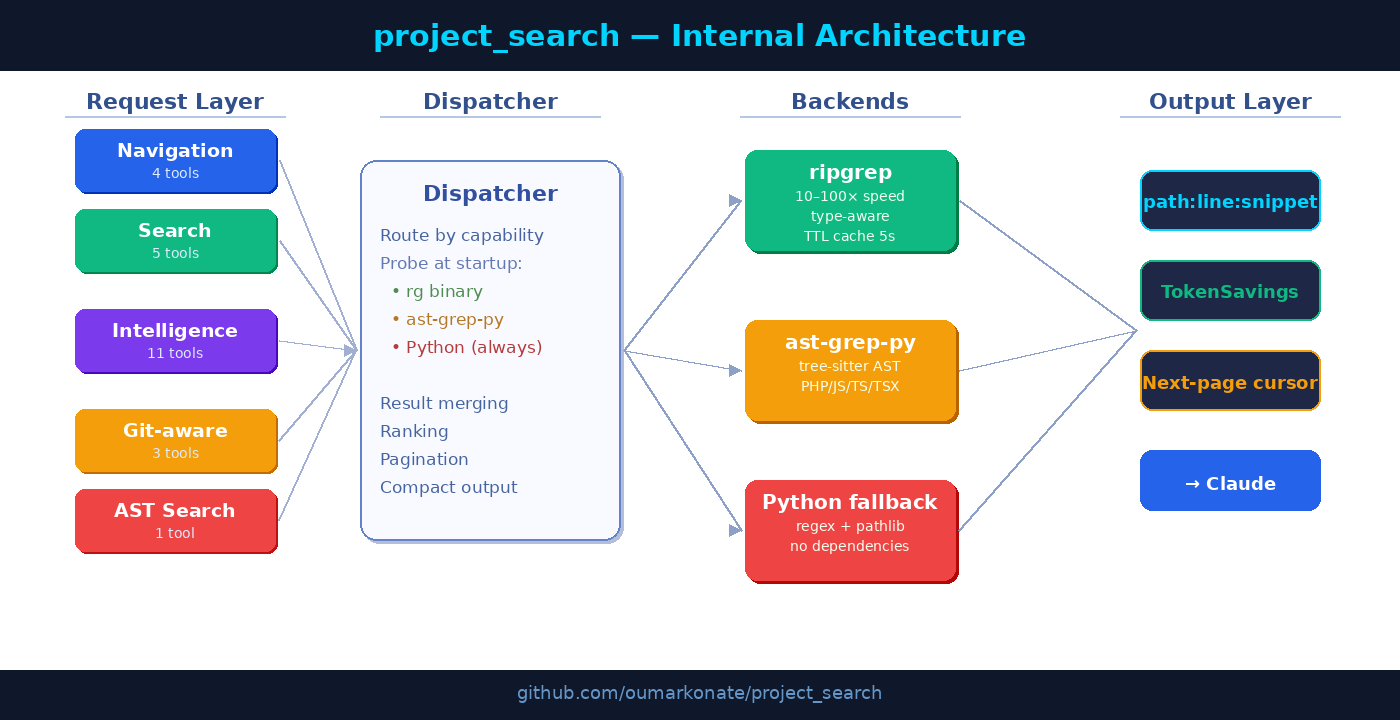
project_search exposes 25 specialized tools across four categories: Navigation, Search, Code Intelligence, and Git-aware search. All are backed by a dispatcher that automatically picks the fastest available engine.
Three Backends
ripgrep is the primary text-search backend. It’s 10–100× faster than a pure Python grep because it uses PCRE2, parallelizes across CPU cores, and uses a native type system (--type php, --type ts) rather than glob patterns. project_search also adds a 5-second TTL in-memory cache so identical repeated queries never re-spawn the binary.
ast-grep-py provides structural code analysis through Python bindings to the tree-sitter parser. This powers tools like find_class, find_implementations, and get_file_outline — operations that regex simply cannot do reliably. It handles PHP, JavaScript, TypeScript, and TSX with near-perfect accuracy.
Python fallback is always available, using re and pathlib. Zero external dependencies. If you can’t or won’t install ripgrep or ast-grep-py, every tool still works — just slower.
The dispatcher probes at startup and silently falls back. From Claude’s perspective, the tool call is the same regardless of which backend ran.
The 25 Tools, Organized
🗂 Navigation & Structure (4 tools)
| Tool | What it does |
|---|---|
directory_tree | Show project structure with configurable depth |
find_files | Find files by name substring or glob pattern |
read_file | Read a file with optional line range (avoids loading full files) |
get_file_outline | List all classes, methods, and functions with line numbers |
🔍 Search (5 tools)
| Tool | What it does |
|---|---|
grep_code | Regex/text search with smart-case, whole-word, fixed-string, pagination |
grep_with_context | Search with N surrounding lines per match |
count_matches | Count occurrences without loading all results |
multi_search | Run up to 10 independent queries in parallel |
ast_search | Structural pattern search (e.g., class $NAME extends $BASE) |
🧠 Code Intelligence (11 tools)
This is the most powerful category. Rather than asking Claude to grep for a symbol and figure out its context, these tools return semantically precise answers:
find_class— locates a class, interface, trait, or enum by name (with optional fuzzy matching)find_method— locates a method or function declarationfind_implementations— finds all classes implementing an interfacefind_extends— finds all classes extending a given parentfind_usages— whole-word symbol search ranked by relevancefind_definition— universal lookup: tries class → method → route → grepwho_calls— finds all call sites of a function, with the enclosing caller namewhat_calls— lists all outgoing calls from a method bodyfind_route— discovers Symfony routes (attributes, annotations, YAML)find_tests— finds the test file(s) for a given source filefind_source— the inverse offind_tests
🔀 Git-Aware Search (3 tools)
| Tool | What it does |
|---|---|
git_changed_files | List files modified since HEAD (or a specific ref) |
grep_changed | Grep only in files modified by git — ideal for code review |
find_in_file_diff | Get the exact line ranges of a git hunk — jump directly to what changed |
Token Economy: Six Mechanisms Under the Hood
The 99% token reduction doesn’t come from a single trick. It’s the compound effect of six design decisions applied consistently across all 25 tools.
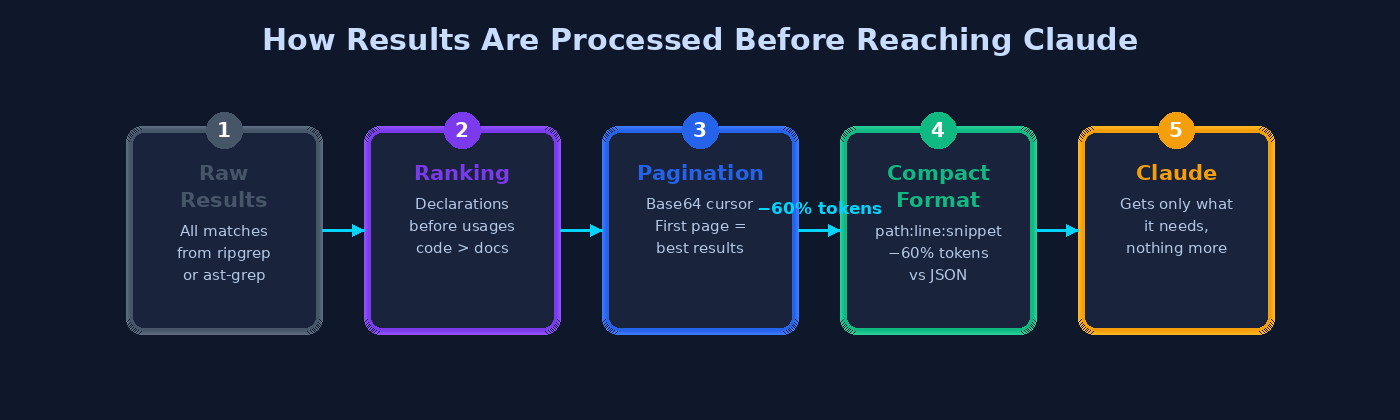
1. Compact Output Format (−60% tokens vs JSON)
Every tool returns results in path:line:snippet format, one match per line:
src/Domain/User.php:42: class User implements Serializable
src/Repository/UserRepository.php:15: class UserRepository implements UserRepositoryInterface
The alternative — returning JSON with keys like "path", "line", "snippet" — consumes roughly 2.5× the tokens for the same information. For a result set of 50 matches, the compact format saves thousands of tokens per call.
2. Ranking Before Pagination
All results are ranked by relevance before they’re paginated. This guarantees that page 1 always contains the most useful matches. The ranking algorithm scores each result on four dimensions:
- +10 for declarations (function/class/interface/const keywords)
- +5 for source locations (src/, lib/, app/, core/…)
- −5 for test locations (tests/, spec/, fixtures/…)
- −10 for matches inside comments
In practice, Claude almost never needs to request a second page — the first page already contains the declaration it’s looking for.
3. TTL Result Cache (5 seconds)
The ripgrep backend caches results keyed by an MD5 hash of the argument list. Identical queries within a 5-second window are served from memory with zero subprocess overhead. This matters in interactive sessions where Claude might call the same search slightly differently within the same turn.
4. Heuristic Comment and String Filtering
Finding usages of a symbol is only useful if you’re not drowning in matches from documentation comments and string literals. project_search implements per-language heuristics to detect whether a match falls inside a comment or string:
- Block comment ranges are pre-computed per file with a single regex pass, then stored as offset arrays for O(1) lookup
- String detection counts unescaped quote characters before the match column — odd count means inside a string
- Single-line comment markers are mapped per extension (
//,#,{#,*)
The cost is O(n) per file scanned, not O(n²) — a deliberate performance choice.
5. Parallel Multi-Search
The multi_search tool runs up to 10 independent queries in parallel using a ThreadPoolExecutor. Total wall time ≈ the slowest single query, not the sum. A common pattern is to combine a declaration search, a usages search, and a test lookup in a single call:
multi_search([
  {"query": "class ContentRepository", "extensions": ["php"]},
  {"query": "ContentRepository(", "whole_word": true},
  {"query": "ContentRepository", "path_glob": "tests/**/*.php"}
])
Three independent searches, one round-trip to the MCP server.
6. TokenSavings Feedback
Every tool response includes a token_savings field that tells Claude — and you — exactly how much work was avoided:
{
  "compact": "src/Domain/User.php:42: class User implements Serializable",
  "token_savings": {
    "files_scanned": 50,
    "estimated_tokens_saved": 60000,
    "note": "searched 50 file(s), 1 match(es)"
  }
}
This isn’t just a vanity metric. It guides Claude’s reasoning about whether to dig deeper or move on, and it makes the efficiency gain tangible to the developer watching the session.
Five Lessons for Building Your Own MCP Server
Building project_search taught me principles that apply to any MCP tool you might write. Here’s what I’d tell myself on day one.
Lesson 1: Think “Minimum Useful Unit”
The hardest design question for each tool was: what is the smallest amount of information Claude actually needs? For a class lookup, that’s a file path and a line number. Not the full file. Not the surrounding 100 lines. Just enough for Claude to form its next decision.
Every byte you return that Claude doesn’t need is a token wasted on both sides — input tokens on the next call, and output tokens on the current one.
Lesson 2: Measure Tokens From Day One
Token efficiency is hard to retrofit. I built TokenSavings into the response schema from the start, which forced me to think about the cost of every tool call during design, not after. If your tool can’t articulate what it saved, it probably isn’t saving much.
Lesson 3: Degrade Gracefully
The ripgrep → ast-grep → Python fallback chain exists because dependencies break in production. If ast-grep-py isn’t installed, find_class falls back to a regex heuristic that’s correct ~90% of the time. Claude still gets a useful answer; the user doesn’t even know the fallback fired.
Design your MCP tools so a missing optional dependency degrades to a slower or slightly less accurate path, not to an error.
Lesson 4: Rank Before You Paginate
Pagination is a necessary evil — you can’t return 500 matches at once. But naive pagination is dangerous: if the most relevant result is on page 3, Claude will waste tokens requesting pages 1 and 2 first, or worse, stop looking after page 1 and give a wrong answer.
Always rank your complete result set before slicing it. Page 1 must be the best page, guaranteed.
Lesson 5: Parallelism Is Free — Use It
A ThreadPoolExecutor in Python costs almost nothing to set up. If your MCP server can serve multiple independent queries simultaneously, expose that as a single tool (multi_search in my case). Claude will learn to batch related lookups into a single call, cutting round-trip count and total latency.
The pattern is simple to implement:
from concurrent.futures import ThreadPoolExecutor

@mcp.tool()
def multi_search(queries: list[SearchQuery]) -> list[SearchResult]:
    with ThreadPoolExecutor(max_workers=min(len(queries), 10)) as pool:
        futures = [pool.submit(grep_code, q.query, **q.options) for q in queries]
        return [f.result() for f in futures]
Quick Start
Prerequisites
- Python 3.10+
- ripgrep (optional but strongly recommended)
- ast-grep-py (optional, for AST-backed tools)
Installation
# 1. Clone the repo
git clone https://github.com/oumarkonate/project_search.git
cd project_search

# 2. Create a virtual environment and install dependencies
python3 -m venv .venv
source .venv/bin/activate
pip install -r requirements.txt

# 3. Create a .env file pointing at your project
echo "PROJECT_SEARCH_ROOT=/absolute/path/to/your/project" > .env

# 4. Wire it up to Claude Code (see below)
Claude Code configuration
Claude Code supports two ways to declare an MCP server. Pick the one that fits your workflow:
Option A — .claude/settings.json (personal or project scope)
Best for personal setups or when you don’t want to commit the server path to the repo:
{
  "mcpServers": {
    "project_search": {
      "command": "/path/to/project_search/.venv/bin/python3",
      "args": ["-m", "project_search"],
      "env": {
        "PYTHONPATH": "/path/to/project_search/.."
      }
    }
  }
}
Option B — .mcp.json at the project root (team-friendly)
Drop a .mcp.json file at the root of any project you want to search. Claude Code picks it up automatically when you open that folder — no manual configuration step needed for your teammates:
{
  "mcpServers": {
    "project_search": {
      "command": "/path/to/project_search/.venv/bin/python3",
      "args": ["-m", "project_search"],
      "env": {
        "PYTHONPATH": "/path/to/project_search/.."
      }
    }
  }
}
Because .mcp.json is a plain file you can commit to Git, every developer who clones the repository and opens it in Claude Code inherits the same MCP tooling automatically — zero onboarding friction.
Key environment variables
| Variable | Required | Default | Description |
|---|---|---|---|
PROJECT_SEARCH_ROOT | ✅ Yes | — | Absolute path to your project root |
PROJECT_SEARCH_EXTENSIONS | No | php,js,ts,tsx,jsx,… | File extensions to include |
PROJECT_SEARCH_EXCLUDE_DIRS | No | vendor,node_modules,… | Directories to skip entirely |
PROJECT_SEARCH_MAX_RESULTS | No | 50 | Default result limit (1–500) |
PROJECT_SEARCH_BACKEND | No | auto | auto | rg | python |
Wrapping Up
project_search started as a frustration with watching Claude burn tokens on file reads that any half-decent grep could handle in milliseconds. It grew into a principled exploration of what it means to build tools for LLMs rather than tools that LLMs happen to be able to use.
The numbers speak for themselves: 25 tools, 3 backends, up to 99% token reduction per code search task. But the bigger lesson is the design philosophy — minimum useful unit, measure what you return, degrade gracefully, rank before paginate, and parallelize freely.
Those five principles will serve you well whether you’re building a code-search MCP, a database-query MCP, or anything else that needs to feed a language model structured information efficiently.
If you find project_search useful, a ⭐ on GitHub goes a long way. And if you build something on top of it or run into issues, open an issue — I read them all.