
Managing one WordPress site is easy. Managing many — across several different themes, currencies and languages — is a different game. This post is the story of a single Model Context Protocol (MCP) server I built so an AI assistant can read and write every site through one typed, schema-driven interface.
The problem: many heterogeneous WordPress sites
My portfolio mixes a tech blog with several real-estate and classifieds platforms, each built on a different theme. Each theme stores the same concept differently: a property price is a meta field here, a serialized array there; coordinates are a JSON-like object in one theme but a comma-separated string in another. Writing a one-off script per site would have been a maintenance nightmare.
I wanted a single tool surface where “update this listing” means the same thing everywhere, and where the differences live in data, not code.
What MCP brings
MCP is an open standard that lets an assistant call typed tools over a clean interface. Instead of shelling out raw HTTP, the assistant calls update_listing(site, id, ...) and gets a validated, structured result. The contract is explicit, which is exactly what makes automation predictable.
The core idea: schema-driven everything
Each theme has one schema.json that declares its custom post type, its meta fields (with types), its taxonomies and per-field serializers. That single file drives almost everything:
- Typing and validation: numbers, booleans, lat/lng and repeater shapes are coerced and checked before any write — unknown keys are refused, system-managed fields are read-only.
- Serialization: the messy theme-specific storage (pipe-separated IDs, serialized dicts) is hidden behind named serializers, so the REST surface stays clean.
- Discovery: a companion mu-plugin exposes the live schema so the server and the theme never drift apart.
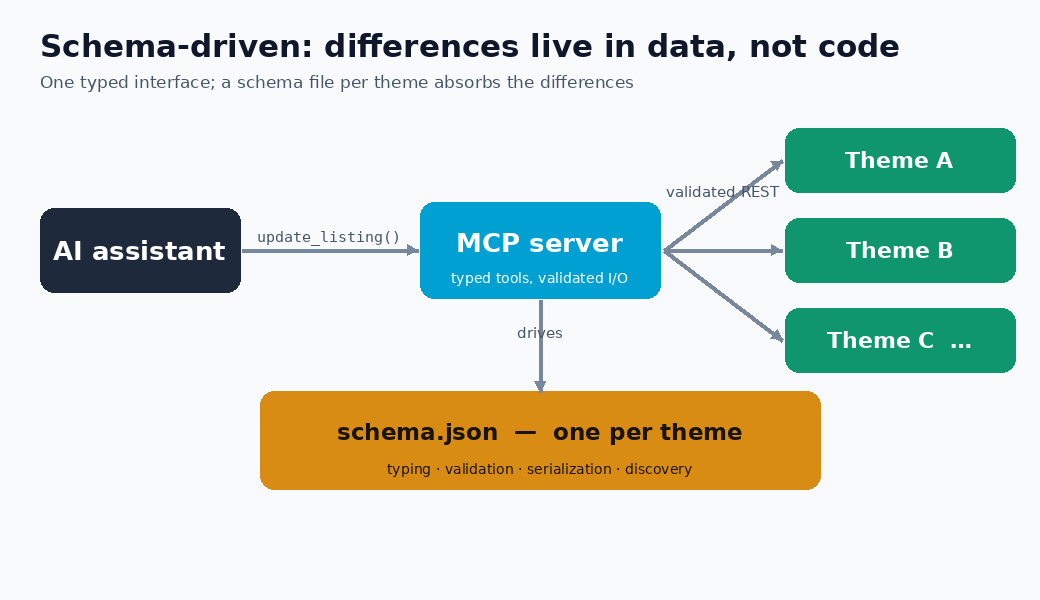
Add a new site on the same theme? Point it at the same schema. Add a new theme? Write one schema file. No new tool code.
Two planes: data and presentation
I split responsibilities deliberately. The data-plane mu-plugin exposes the custom post type, its meta and taxonomies to REST, gated by the presence of schema.json. A separate set of presentation modules — JSON-LD structured data, a dynamic /llms.txt, and a cache-flush endpoint — boot independently, each behind its own kill-switch. A blog with no schema.json simply keeps its data-plane silent while the SEO modules still run.
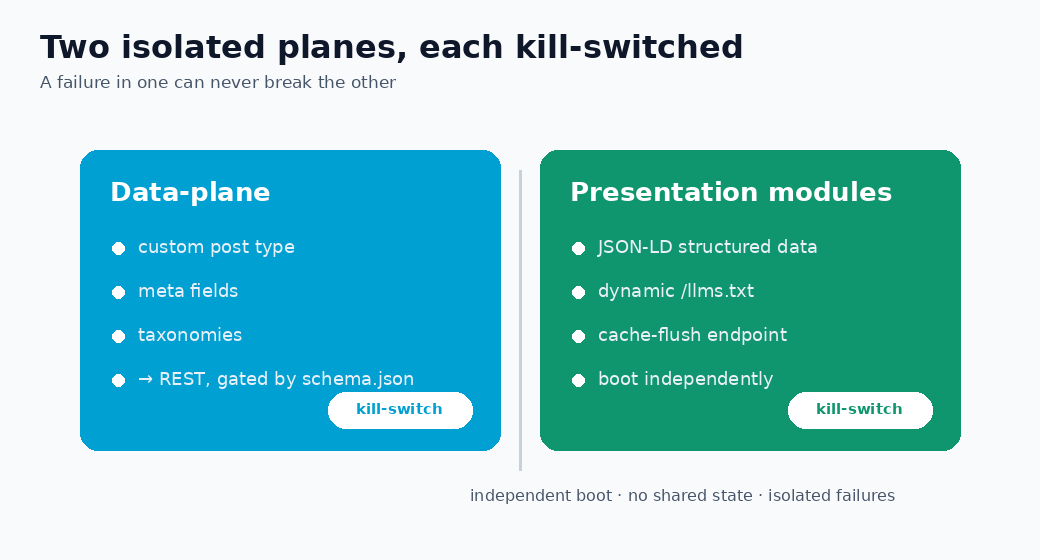
This isolation paid off: a change to structured data can never break listing writes, and a missing optional dependency degrades gracefully instead of 500-ing the site.
Lessons learned
1. Put the variability in data
Every time I was tempted to add a theme-specific if branch in code, I asked whether it belonged in schema.json instead. Ninety percent of the time it did. The codebase stayed small while the portfolio grew.
2. Make writes defensive by default
Validating against the schema before the REST call catches mistakes early and returns a clear message instead of a half-applied update. Read-only system fields are refused outright.
3. Additive, kill-switched modules
New features ship as separate modules wrapped in try/catch and guarded by an option flag. Rollback is “delete the file or flip the flag” — never a risky revert.
4. Test the pure parts without WordPress
The JSON-LD and llms.txt builders are written as pure functions with no WordPress globals, so they run in a plain PHP test harness. Combined with the Python unit tests, that keeps a multi-hundred-test suite green on every change.
FAQ
What is a schema-driven MCP server?
An MCP server whose behaviour — typing, validation, serialization — is configured by a declarative schema file rather than hard-coded per integration. New sites are configuration, not new code.
Why not just use the WordPress REST API directly?
The core API exposes raw, untyped meta and differs per theme. The schema layer gives a uniform, validated surface so the same command works across very different themes.
Does this lock me into one theme?
No — that is the point. Each theme is one schema file; adding or swapping themes does not touch the tool code.
This started as a way to stop repeating myself across many dashboards. It became a small lesson in a bigger principle: when integrations multiply, push the differences into data and keep the code boring.