
At work, I’m currently running a CKEditor 5 migration from v26 to v47. On paper, just a “version bump”. In real life: around twenty in-house plugins, each stuffed with deep legacy imports like @ckeditor/ckeditor5-core/src/plugin, that all have to be swapped for the modern named exports of the flat ckeditor5 package. Multiply that by every plugin, add the config files that reference them, and you get a migration where the hard part isn’t technical but bookkeeping: knowing, at any moment, what’s done, half-done, or not started.
Tracking that by hand — or worse, asking an AI to re-read 200 files every session — is slow, expensive and error-prone. So I took the problem from the other end and turned it into an MCP server. It’s called ckeditor_audit and the code is public.
The trigger: what if I audited with an MCP?
An MCP (Model Context Protocol) server exposes tools that assistants like Claude can call directly. The idea: instead of the AI guessing my migration status by reading files one at a time, it queries a server that has already pre-indexed the whole project and answers in a single round-trip.
The server is read-only — it never writes to my code, it observes and reports. Two goals drove me: first, full visibility on migration progress; second, a drastic AI token saving. The two turned out to be linked: the fewer raw files the AI reads, the cheaper it gets, and the sharper its answers.
The core: migration audit
Two tools carry most of the value. audit_plugin returns a detailed report for a given plugin, and audit_all summarizes the whole project. Every plugin is sorted into one of four statuses, deduced automatically from its imports:
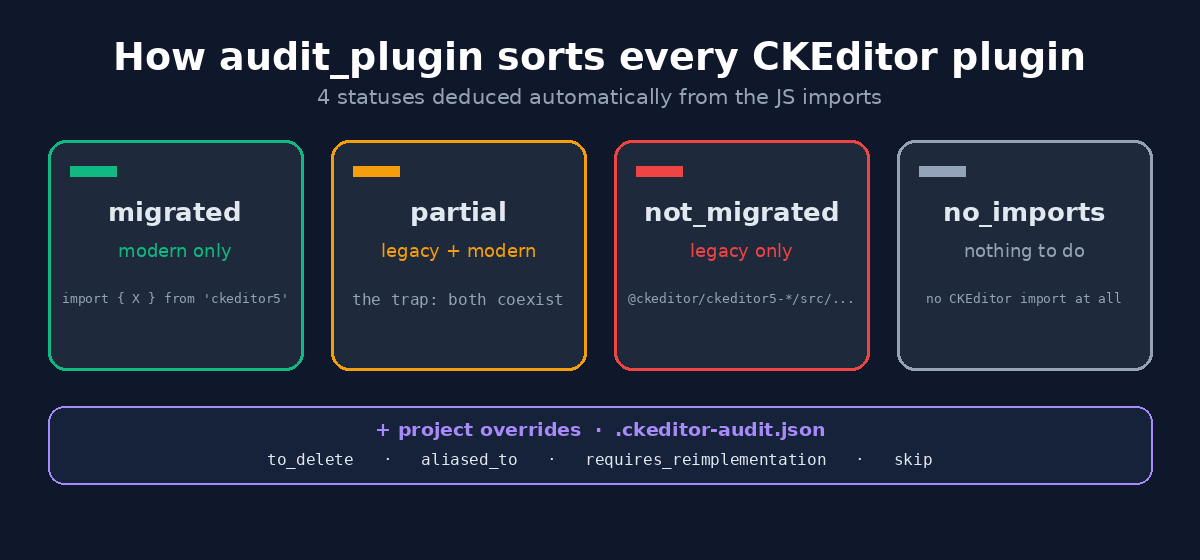
migrated— no legacy import detected, the plugin is clean.partial— the trap: legacy and modern imports coexist in the same plugin. Exactly the kind of thing a human eye lets slip.not_migrated— legacy only, nothing has moved yet.no_imports— the plugin imports nothing from CKEditor at all. It used to be lumped in with “not migrated”; now it gets its own status, so an empty or unrelated folder never inflates the “to do” pile.
But the status isn’t enough: the report drills down to the technical detail. For every legacy pattern found, it gives the exact file and line, the matched legacy signature, and the suggested modern replacement. It also reads the plugin’s package.json to surface the CKEditor version declared there alongside what the code actually imports, and lists the config files that reference the plugin, distinguishing active references from those that only live in commented-out code — a classic blind spot of ad-hoc grep calls.
The most frequent pattern of this migration is this one:
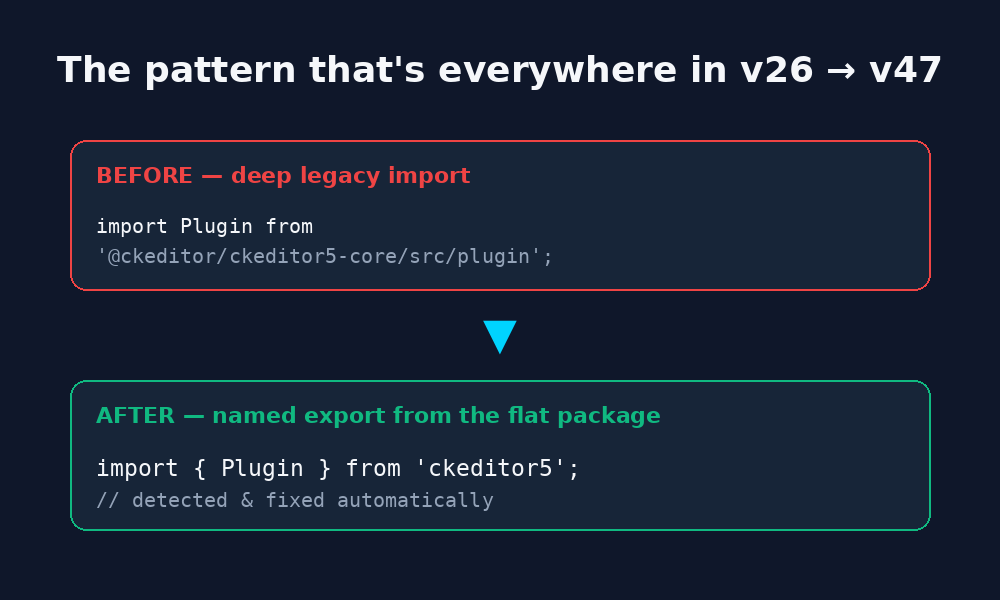
// BEFORE (v26)
import Plugin from '@ckeditor/ckeditor5-core/src/plugin';

// AFTER (v47)
import { Plugin } from 'ckeditor5';
Active in production, or just commented out?
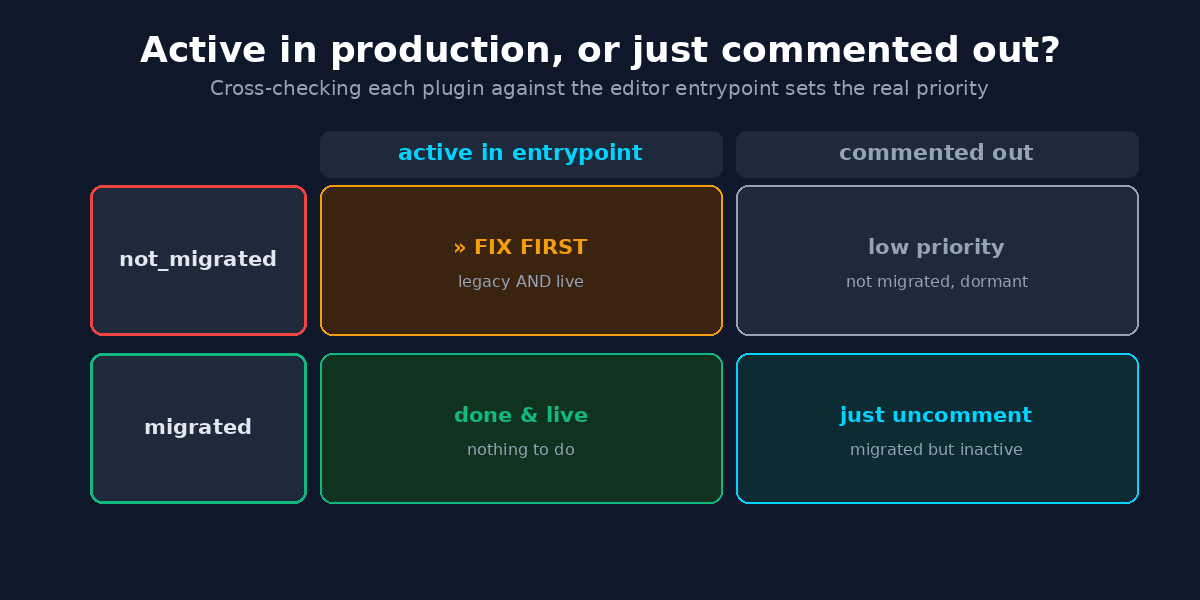
A status alone can mislead you on priority. A plugin that’s still on legacy imports but commented out of the editor build is harmless; the same plugin active in production is the one to fix first. So the server cross-checks every plugin against the editor entrypoint and turns the pair (status × entrypoint state) into a clear priority grid:
Some decisions can’t be deduced from code at all — a plugin that should be deleted, one that was renamed, or one that needs a functional rewrite. Those go in an optional .ckeditor-audit.json file, versioned in the audited project (not in the MCP). It declares per-plugin overrides — to_delete, aliased_to (e.g. an old ckeditor5-old-foo folder that really points to ckeditor5-foo), requires_reimplementation, or skip — and the report folds them in instead of blindly flagging those folders as “to migrate”.
The macro view: audit_dependencies
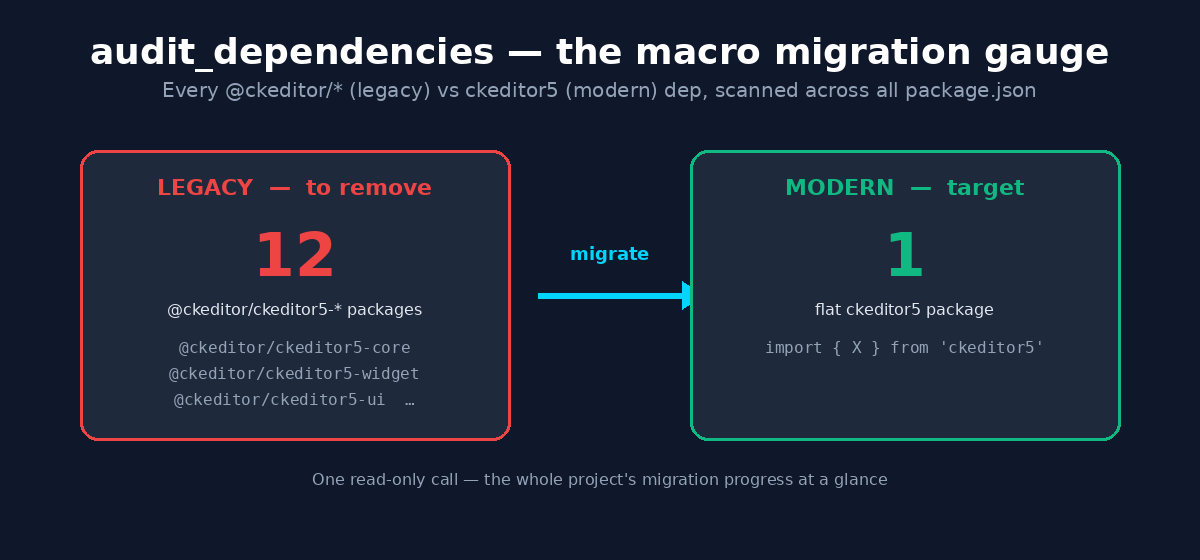
Per-plugin detail is great for the day-to-day, but sometimes you just want the altitude reading: how far along is the whole thing? That’s audit_dependencies — one read-only call that scans every package.json in the project and counts the legacy @ckeditor/ckeditor5-* packages still declared versus the modern flat ckeditor5 one.
The argument that changes everything: token saving
Here’s the calculation that convinced me to write this server. Without it, to understand the state of a single plugin, the AI typically reads 3 to 10 files: the plugin source, its package.json, the config files using it. Across twenty plugins, that’s 6000 to 15000 tokens just for discovery, before a single line of migration work. And in a long session, every re-read restarts the meter.
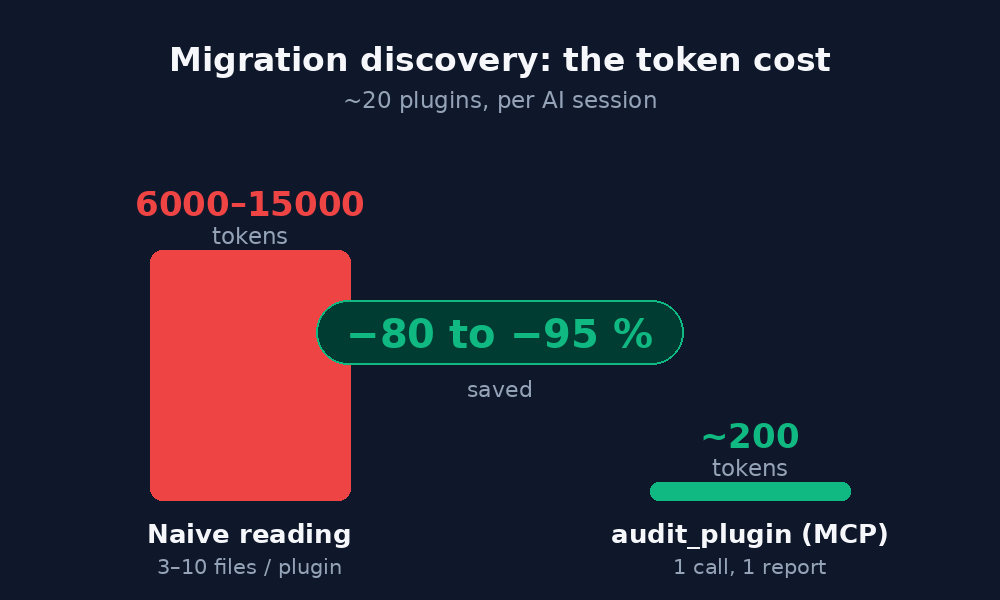
The server, on the other hand, has already indexed everything. One audit_plugin call returns a report of about 200 tokens covering status, detected patterns and config references. The saving runs between 80 and 95% of discovery tokens per session. Each report even carries a token_savings field that quantifies what was just avoided. A nice bonus: coverage is better than a manual grep, because the server searches across all relevant file types (JS entry files, YAML configs, PHP constants, plugin registries) and even catches usages in commented-out code.
Not just an auditor: 33 search tools
Along the way, the server became a real Swiss-army knife for code navigation — 33 tools in total. Under the hood, two engines: ripgrep for blazing-fast text search (falling back to Python’s re if it isn’t installed), and ast-grep for structural search.
- Text search:
grep_code,grep_with_context,count_matches(to gauge scope before digging),multi_search(up to 10 queries in parallel). - Structural search:
ast_searchwith a pattern syntax likeclass $NAME extends Plugin, plusfind_class,find_method,who_calls,what_calls. - Git-aware navigation:
git_changed_files,grep_changedto restrict a search to changed files only.
The server also exposes a guided MCP prompt, migrate_plugin, which assembles the current status and ready-to-use migration instructions. And three slash commands for Claude Code: /ckeditor-audit (the dashboard), /ckeditor-migrate <plugin> (the full audit → suggest → apply → validate workflow) and /ckeditor-report (the final Markdown or JSON report).
Built to be reusable
My favorite part: nothing is hardcoded for my migration. The legacy → modern mapping table lives in a plain lib/data/patterns.json file — you add an entry (with "is_regex": true for a regular expression) without touching code. And here’s the reliability guarantee I care about most: a generic fallback rule catches any deep @ckeditor/ckeditor5-* import not covered by a specific entry. So if a plugin is flagged not_migrated, suggest_migration never comes back empty-handed — there’s always at least one concrete fix to apply. No silent gaps.
The version labels are configurable too: v26 as source, v47 as target in my case, but those are just two environment variables. In other words, this server can serve as an audit backbone for any A → B migration of CKEditor 5, not just mine.
The takeaway
Since I started using ckeditor_audit, my migration lost its anxiety-inducing side: I always know what’s migrated, partial, not_migrated or no_imports, which plugins are actually live in production, my AI sessions cost a fraction of what they used to, and every fix is traceable. A very concrete work problem turned into a reusable tool — exactly the kind of detour that ends up saving time.
The code is open and feedback is welcome: github.com/oumarkonate/ckeditor_audit.